A Deep Dive Into Augmented Reality in Aerospace and Aviation Operations
In the aerospace industry, the margin for error is virtually zero. From aircraft manufacturing to maintenance, inspection, and pilot training, every task demands extraordinary accuracy, deep technical knowledge, and unwavering consistency. Even the most minor error can have significant consequences, which is why the industry relies heavily on advanced training and precision tools. Traditional learning methods often struggle to keep pace with increasingly complex aircraft systems and the need for fast, accurate decision-making.
This is where Augmented Reality (AR) steps in to close the gap. AR enhances technical workflows, training, and inspections by overlaying digital guidance directly onto real aircraft environments. In this article, we will explore how Augmented Reality in aerospace is transforming manufacturing, training, maintenance, and operational precision.
What Is Augmented Reality in Aerospace?
Augmented Reality in aerospace is the application of digital overlays, such as 3D models, procedural instructions, sensor data, and visual markers, directly onto real aircraft, components, or training environments. AR enhances how technicians, engineers, pilots, and ground crews perform high-precision tasks by placing the right information exactly where it is needed.
In aviation, AR integrates with aircraft manuals, digital twins, maintenance systems, and operational data sources to deliver accurate, up-to-date guidance. Organizations, including the FAA and NASA, recognize the role of advanced visualization tools in improving safety, training, and technical reliability.
How AR Works in High-Precision Aerospace Environments?
AR solutions combine sensor inputs, spatial mapping, and real-time data processing to overlay digital elements on real aircraft systems. In aerospace settings, AR systems typically include:
1. Real-Time Object Recognition and Tracking
AR systems use cameras, sensors, and computer vision to identify aircraft components, tools, and environments. This allows the technology to lock onto real objects and place digital overlays with exact alignment. In maintenance or assembly tasks, this ensures that instructions appear precisely where the technician needs them.
2. Context-Aware Digital Overlays
Once the environment is recognized, AR displays relevant data, such as torque values, wiring diagrams, part numbers, or inspection steps, over the actual components. For high-precision tasks like engine maintenance or avionics updates, this reduces guesswork and prevents procedural errors.
3. Hands-Free Interaction for Maximum Accuracy
Aerospace environments demand both hands and full attention. AR-enabled headsets or smart glasses allow professionals to interact with holographic content through gestures, voice commands, or gaze control. This hands-free workflow ensures uninterrupted focus and greater accuracy during complex operations.
Key Use Cases of AR in Aerospace
Augmented Reality supports multiple aviation workflows across manufacturing, operations, and training. Below are the leading use cases in the sector.
Maintenance and Inspection
Technicians can access digital step-by-step workflows overlaid directly on aircraft components. AR reduces human error and supports Augmented Reality in aviation maintenance, especially for legacy systems with aging documentation.
Assembly and Manufacturing
AR improves accuracy during component assembly, wiring, and structural work. Aerospace manufacturers use AR to accelerate complex builds, verify tolerances, and guide workers through multi-step procedures.
Pilot and Crew Training
AR for pilot training enriches situational awareness with realistic cockpit overlays, weather simulations, and emergency response guidance. AR complements Level-D simulators, providing accessible, scalable training.
Remote Assistance and Collaboration
AR enables real-time support from experts anywhere in the world. A technician wearing AR glasses can share their field of view with an engineer, who can then annotate the display with guidance markers or instructions. This reduces downtime, avoids unnecessary travel, and accelerates problem resolution.
Quality Control and Inspection
Inspectors can use AR to compare real aircraft components with digital twins to identify deviations, wear, or missing parts. This is especially valuable in structural inspection, nondestructive testing (NDT), and pre-flight checks, making inspections faster, more accurate, and consistent.
Navigation and Cockpit Overlays
AR enhances pilot situational awareness by projecting navigation cues, terrain data, runway markers, and weather information directly into the cockpit view. By overlaying this data onto the real world, pilots can make faster, more accurate decisions, especially in low visibility or complex airspace.
Ground Operations and Safety
AR supports ground crews by displaying aircraft parking paths, hazard zones, loading instructions, and inspection steps in real time. This helps teams work faster and safer, reducing errors during fueling, inspections, and turnaround operations while improving overall airport efficiency.
Visualization of Design and Prototyping
AR helps engineers visualize full-scale aircraft models or components during the design phase. Teams can walk around, inspect, and interact with virtual prototypes before a physical version exists. This shortens design cycles, helps detect potential issues early, and promotes better collaboration between engineering teams.
Benefits of AR for Aerospace Teams and Processes
Aerospace organizations gain several powerful advantages from AR adoption, streamlining operations, improving workforce performance, and enhancing overall safety. Let’s look at some key benefits of AR in aerospace:
Higher Accuracy and Fewer Errors: AR provides pinpoint guidance and real-time visual cues, helping technicians and pilots perform complex tasks with greater precision.
Faster Training and Skill Development: Trainees can learn procedures in immersive, interactive environments, reducing training time without compromising quality.
Reduced Downtime: With instant digital instructions and remote expert assistance, teams resolve issues faster, minimizing aircraft downtime.
Improved Safety: AR highlights hazards, ensures adherence to proper procedures, and helps crews maintain situational awareness in high-risk environments.
Enhanced Collaboration: Experts can guide on-site staff remotely by seeing their exact view and providing live visual annotations.
Lower Operational Costs: AR helps cut maintenance and training expenses by reducing rework, speeding up inspections, and preventing mistakes.
Streamlined Workflows: AR integrates with digital twins, manuals, and data systems to provide context-aware instructions that simplify every step of aerospace operations.
Hands-Free Guidance: Smart glasses and AR headsets let technicians follow instructions without having to stop to check manuals or devices.
Remote Assistance: Field crews can get immediate support from off-site specialists, who guide them through tasks with live visual cues.
AR for Aerospace Maintenance, Repair, and Overhaul (MRO)
MRO operations involve strict timelines, complex documentation, and precision-based tasks. AR streamlines these workflows by:
Overlaying checklists directly onto aircraft surfaces
Providing guided repair instructions
Displaying digital twins for internal structure visibility
Enabling remote expert assistance
Supporting AR for aircraft inspection with automated detection markers
Example: Organizations such as Airbus and Boeing have demonstrated significant time reductions in wire harnessing, structural repair, and inspection workflows through AR-assisted procedures.
The immersive technology brings consistency to MRO operations, improves accuracy, and reduces turnaround times, critical for airlines managing tight schedules and maintenance budgets.
AR in Pilot and Crew Training Programs
Augmented Reality enhances aviation training by adding contextual visuals to existing learning environments. Unlike conventional training that relies on static simulators or manuals, the use of Augmented Reality in aviation offers dynamic overlays that simulate cockpit elements, environmental changes, and emergency events.
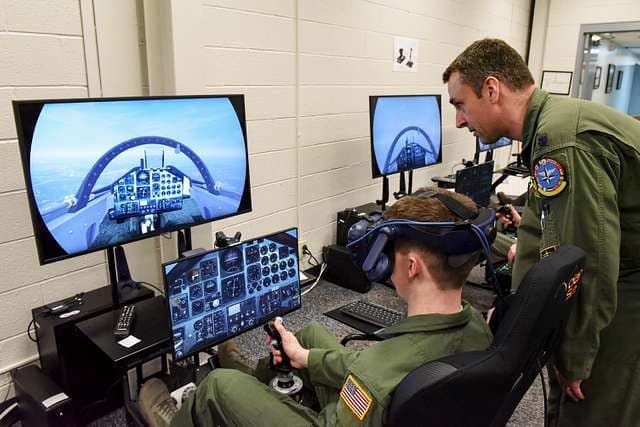
Key applications include:
AR for pilot training with interactive flight deck visuals
Real-time feedback during maneuver and procedure walkthroughs
Emergency response scenarios without full simulator setups
Crew coordination and safety procedure training
Cabin crew simulations on safety, service, and emergency workflows
The use of interactive and visual training tools helps improve aviation safety and decision-making. AR reduces training fatigue, accelerates skill development, and lowers dependency on high-cost physical simulators.
Example: Avionics training programs have incorporated AR to overlay 3D models and live instructions on aircraft components, enabling trainees to practice maintenance and troubleshooting virtually before working on actual planes, thereby boosting pilot proficiency and safety.
AR for Aircraft Design, Simulation, and Prototyping
Design teams and aerospace engineers use AR to visualize aircraft structures, test component placements, and review design concepts before building physical mockups. This reduces prototyping cycles and supports faster decision-making.
Key benefits include:
Reviewing 3D models at full scale
Simulating airflow, structural changes, and part alignment
Comparing design variations side by side
Detecting errors earlier in engineering cycles
Streamlining collaboration among distributed aerospace teams
Example: Fraunhofer FKIE's AR system for Airbus A400M overlays 3D instructions on cockpits and batteries via HoloLens glasses. Mechanics perform maintenance tasks with gesture controls, improving accuracy and enabling remote expert support.
App-Less AR: Improving Adoption and Field Deployment
A major challenge in aerospace digital transformation is adoption. Traditional AR requires specialized applications or headsets, which slows down deployment, especially in hangars or on flight lines.
App-less AR removes these barriers. It allows technicians, pilots, and engineers to access AR content through a simple browser link without downloads or installations. This supports:
Faster onboarding
Wider device compatibility
Instant access to updated procedures
Easier deployment for large aerospace workforces
Lower IT and hardware overhead
For high-turnover environments such as MRO and ground operations, app-less AR accelerates rollout and ensures consistent usage across teams.
Implementation Framework for Aerospace Companies
Adopting AR in aerospace requires a structured approach to ensure technology enhances precision, safety, and efficiency. Here’s a step-by-step framework companies can follow:
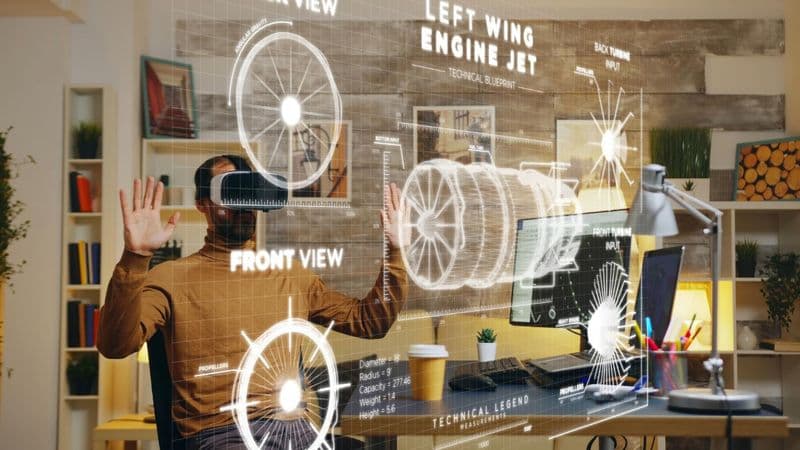
1. Assess Needs and Identify Use Cases
Evaluate which processes, such as maintenance, training, design, or operations, would benefit most from AR. Prioritize areas with high complexity, frequent errors, or significant downtime.
2. Choose the Right AR Hardware and Software
Select AR devices (headsets, tablets, or smart glasses) and software platforms that integrate with existing systems and support the intended workflows. Consider factors like durability, hands-free capability, and ease of use in aerospace environments.
3. Integrate with Existing Systems
Connect AR solutions with digital twins, maintenance databases, CAD models, and training platforms to ensure real-time, context-aware guidance. Integration is key to maximizing accuracy and efficiency.
4. Deploy App-less AR for Easy Adoption
Implement AR experiences that don’t require complex installations or dedicated apps. Web-based or cloud-hosted AR allows technicians and pilots to access guidance instantly on any device, reducing setup time and speeding adoption.
5. Train the Workforce
Provide hands-on training for engineers, technicians, and pilots to use AR tools effectively. Include both operational guidance and troubleshooting to build confidence and adoption.
6. Pilot, Evaluate, and Scale
Start with a small-scale pilot in one department or process. Measure performance improvements, error reduction, and time savings. Use insights to refine AR applications before wider rollout.
7. Monitor, Maintain, and Update
Continuously update AR content to reflect new procedures, aircraft models, or regulatory changes. Monitor system performance and gather user feedback to ensure sustained benefits.
Key Metrics to Measure AR Adoption and ROI
Measuring the success of AR in aerospace is critical to justify investment and optimize its use. The following metrics help aerospace organizations evaluate adoption and quantify ROI:
Task Accuracy and Error Reduction: Measure the decrease in mistakes during maintenance, assembly, inspections, or training. Fewer errors directly reflect AR’s impact on precision and safety.
Time Savings and Productivity Gains: Track how much faster tasks are completed with AR guidance compared to traditional methods. Reduced task times increase operational efficiency and lower labor costs.
Training Efficiency and Knowledge Retention: Assess the time taken for trainees to reach proficiency and how well they retain skills over time. Faster learning curves and better retention indicate AR’s value in training programs.
Adoption Rate and User Engagement: Monitor the number of employees actively using AR tools and the frequency of use. High adoption signals ease of use, relevance, and acceptance among teams.
Reduction in Downtime: Evaluate reductions in aircraft ground time resulting from faster maintenance, troubleshooting, or inspection processes enabled by AR.
Cost Savings and ROI: Compare operational costs before and after AR implementation, including reduced rework, fewer errors, shorter training cycles, and less downtime.
Safety and Compliance Improvements: Track incidents, near misses, and compliance deviations. AR should enhance safety by guiding users through correct procedures and highlighting hazards.
Remote Collaboration Effectiveness: Measure the frequency and effectiveness of AR-enabled remote support sessions. Faster problem resolution and fewer travel requirements indicate tangible ROI.
These metrics allow leadership teams to evaluate performance improvements and justify further investment.
Challenges and How to Overcome Them
Despite the benefits, aerospace organizations face obstacles when adopting AR:
1. Resistance to new tools
Technicians and crew members often prefer familiar, manual processes.
Solution: Deploy app-less AR for easy access, run short onboarding sessions, and demonstrate measurable time savings to build trust.
2. Integration complexity with existing aviation systems
Aerospace workflows rely on tightly regulated platforms such as maintenance systems, digital twins, and training programs.
Solution: Choose AR platforms with robust APIs and modular integration capabilities to connect with CMMS, LMS, and engineering databases.
3. Hardware durability and usability in harsh environments
Hangars, flight lines, and manufacturing floors expose devices to dust, vibration, and temperature variations.
Solution: Use rugged tablets and optional AR wearables designed for industrial environments, ensuring consistent performance in field conditions.
4. Regulatory and documentation requirements
FAA, EASA, and OEM standards demand high accuracy and traceability.
Solution: Align AR workflows with certified procedures and maintain audit-ready digital records for inspections, training, and maintenance logs.
5. Content creation and 3D modeling challenges
Building AR manuals, 3D assets, and step-by-step instructions can be time-consuming without the right tools.
Solution: Implement no-code or low-code AR platforms that allow internal teams to create, update, and distribute AR content quickly.
6. Connectivity and bandwidth limitations
Large hangars or remote sites may lack stable Wi-Fi or 5G coverage.
Solution: Enable offline AR capabilities or edge-based rendering so teams can access guidance without relying on continuous connectivity.
Overcoming these challenges ensures a smoother path to adoption and long-term success.
Future of AR in the Aerospace Sector
The future of AR in aerospace will be shaped by deeper integration with AI, digital twins, predictive maintenance systems, and next-generation training technologies. AR will evolve from a supportive tool to a core capability across manufacturing, MRO, and aviation training. Expected advancements include:
AI-powered inspections that auto-highlight defects
AR-guided autonomous maintenance systems
Intelligent digital twins for real-time decision-making
Personalized aviation training based on performance data
AR-enhanced cockpit and navigation overlays
Autonomous and semi-autonomous maintenance support
AR-driven collaboration among global aerospace engineering teams
As aircraft fleets grow and aviation complexity increases, AR will become a standard part of aerospace training, operations, and manufacturing.
Conclusion
Augmented Reality in aerospace is transforming training, manufacturing, maintenance, and safety. With app-less AR, advanced tracking, digital twin integration, and enterprise-ready platforms, organizations can reduce errors, improve accuracy, and cut operational costs. As adoption grows, AR will play an essential role in shaping the next generation of aviation efficiency and innovation.
Comments
Your comment has been submitted